![[YMCA of Greater Toledo LOGO SQ]](https://recliquecore.s3.amazonaws.com/imgs/ymca_logos/named_y/blue_purple.png)
![[YMCA of Greater Toledo LOGO FULL]](https://s3.amazonaws.com/recliquecore/imgs/ymca_logos/named/blue_purple.png)

EARN POINTS. REDEEM FOR Y SWAG.
Members earn points for using the in-app bar code at check-in. Points can be redeemed in the app for Y Swag or Y gift cards.
DOWNLOAD THE APP
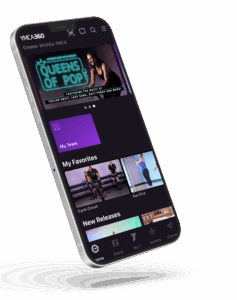
HOW TO GET STARTED
Download the YMCA360 App from the App Store or Google Play.
Sign in using your YMCA of Greater Toledo membership credentials.
Use the app to scan into the branch each time you visit — and start earning points!
Important: Make sure your location services are turned on to ensure your scan is counted.
1 point per day: Scan into your branch using the YMCA360 app (1 scan per day max per member).
10 bonus points: During your birthday month (applied automatically annually during the members birthday month).
10 bonus points: If you downloaded the YMCA360 app after December 1, 2024 (available one time per member).
*To qualify for the 10 bonus points, the YMCA360 app must be downloaded on or after December 1, 2024.
Open the YMCA360 app.
Tap the “My Points” tile on the home screen.
Select the “Rewards” tab to view available options.
Choose your reward and follow the prompts to confirm.
A confirmation email will be sent to you. Your reward will be delivered to your home branch within 14 business days, unless otherwise noted.
Your reward will be sent to the YMCA branch you call home and will be ready for pickup within 14 business days of redemption — unless otherwise noted in your confirmation email.
Yes. YMCA360 Reward Points expire 18 months from the date they are earned.
For example, if you earn a point on October 13, 2025, that point will automatically expire on April 13, 2027 if it hasn’t been redeemed.
We’ve added this timeline to encourage members to use their points regularly and enjoy the Y-swag and experiences they’ve earned!
Tip: Check your YMCA360 App often to track your current points and see what you can redeem them for before they expire.
TROUBLE SHOOT
If your points aren’t showing up, here’s what to check:
Your location services must be turned on for the YMCA360 app to track your check-ins.
Make sure you’re scanning from the app when you visit the branch. Members scanning in with the traditional keyfob are not eligible for reward points.
For iPhone:
Go to Settings > Privacy & Security > Location Services.
Make sure Location Services is on.
Scroll down and tap YMCA360.
Select “While Using the App” or “Always” for best results.
Toggle Precise Location to on.
For Android:
Go to Settings > Location.
Make sure Location is turned on.
Tap App permissions and find YMCA360.
Choose “Allow only while using the app” or “Allow all the time”.
Enable Use precise location, if available.
2026 T-Shirt Design